Implementation & Technical

You do not need to buy new software to run ATLAS

The Excel, Google Sheets, database and ERP you already use are enough. We handle the installation.

How it is installed

Four steps

1

Discovery

Which department keeps its data where, and which information is stuck on paper — we map it together.

2

Connection and design

It connects to your existing files and databases, and entry screens are designed for the paper-bound processes. Your files never move.

3

Installation

It is installed on a computer or a local server at your premises. It opens in a browser.

4

Handover

We walk the department managers through it. There is no complex interface to learn.

Timeline

How long does it take?

Between 2 and 8 weeks, depending on company size and how tidy your data is.

Your day-to-day operation does not stop during that time.

2–3 weeks

20–50 employees, data mostly in Excel or Sheets, reasonably tidy.

4–6 weeks

50–200 employees, an ERP in place, a few processes still running on paper.

6–8 weeks

200–500 employees, more than one site, paper processes throughout.

Why does it vary?

What sets the timeline is not ATLAS but how scattered your data is. After the discovery session we give you a firm schedule.

Software required

There is nothing for you to install

ComponentWhat is needed
Where it runsA computer at your premises (Windows or macOS) or a local server.
How it is usedA browser — Chrome, Edge, Safari. Nothing is installed on the user's side.
Data entryThe same browser; it also opens on phones and tablets. No app download.
Server sideWe set up the runtime environment. You do not have to download anything.
AI layerTwo options: (a) a fully local model — no internet needed, no data leaves the machine. (b) a cloud model — via an API key. The choice is yours.
Additional licencesNone. No per-user licence, no server licence, no database licence.
Nothing is installed on your team's computers.

They click a link and see the dashboard. That is it.

Your existing systems

How does ATLAS work with what you already use?
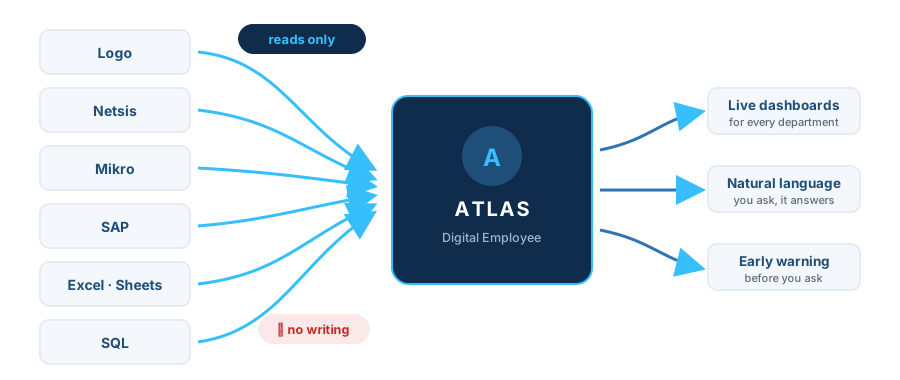
One-way data flow from Logo, Netsis, Mikro, SAP, Excel, Sheets and SQL into ATLAS; outputs: live dashboards, natural-language answers, early warnings
The arrow points one way. ATLAS reads; it does not write a single line to your system.
Your systemWhat ATLAS does
LogoReads its reports and exports; reads directly if database access is granted. It never writes.
NetsisThe same — reads its reports and exports. It never writes.
MikroThe same — reads its reports and exports. It never writes.
SAPReads report output and authorised views. It never writes.
Excel filesReads them where they are. It does not change the format or move the file. You update it, the dashboard refreshes.
Google SheetsConnects directly. Data entered in the field lands on the dashboard immediately.
SQL databaseQueries it. Read-only — not a single row is written.
Accounting softwareReads ledger, invoice and collection exports.
Paper · notebooks · chat groupsFor these processes it builds a new entry screen — information enters the system the moment it is created.

The golden rule

ATLAS writes nothing to your existing systems. It only reads. That is why there is no risk of breaking what already works. Not one record in your ERP changes, not one field is corrupted.

System requirements

A modest office computer is enough

We check together in the discovery session whether your hardware is up to it — in all likelihood it already is.

Let us talk about how long implementation would take for you.

A firm schedule and quote after the discovery session.

Request a live demo