Departments / Logistics & Warehouse

Logistics & Warehouse

On-time delivery rate, sell-through, dead stock.

This department's pain

Sound familiar?

  • What shipped and what is left in which warehouse cannot be known without counting delivery notes.
  • Are we keeping our delivery promises? You find out when the customer complains.
  • There is stock in the warehouse that has not moved for months and nobody notices.
  • Delivery confirmation is on paper; it takes days to reach the office.

Logistics & Warehouse department

What does ATLAS read?

Shipment records, delivery notes, warehouse stock lists, delivery dates and product movement history.

Data entry

What does ATLAS make easier?

Delivery confirmation from a phone — the driver or warehouse supervisor marks it at dispatch and the office sees it instantly. No waiting for the paper delivery note.

Metrics it tracks

What does it look at in this department?

Sample questions

What does this department's manager ask ATLAS?

No spreadsheets, no formulas, no report requests — you write it exactly as you would say it.

“Which product has stock piling up?”
“What is my on-time delivery rate?”
“Which warehouse is filling up?”
“How much did I ship this month?”
Early warning

It tells you before you ask

ATLAS: Product X has not moved in four months — dead-stock risk, and it is blocking warehouse space.
← All departments
Warehouse dispatch is marked from a phone; nobody waits for the delivery note to reach the office.
Screenshot

Logistics & Warehouse dashboard

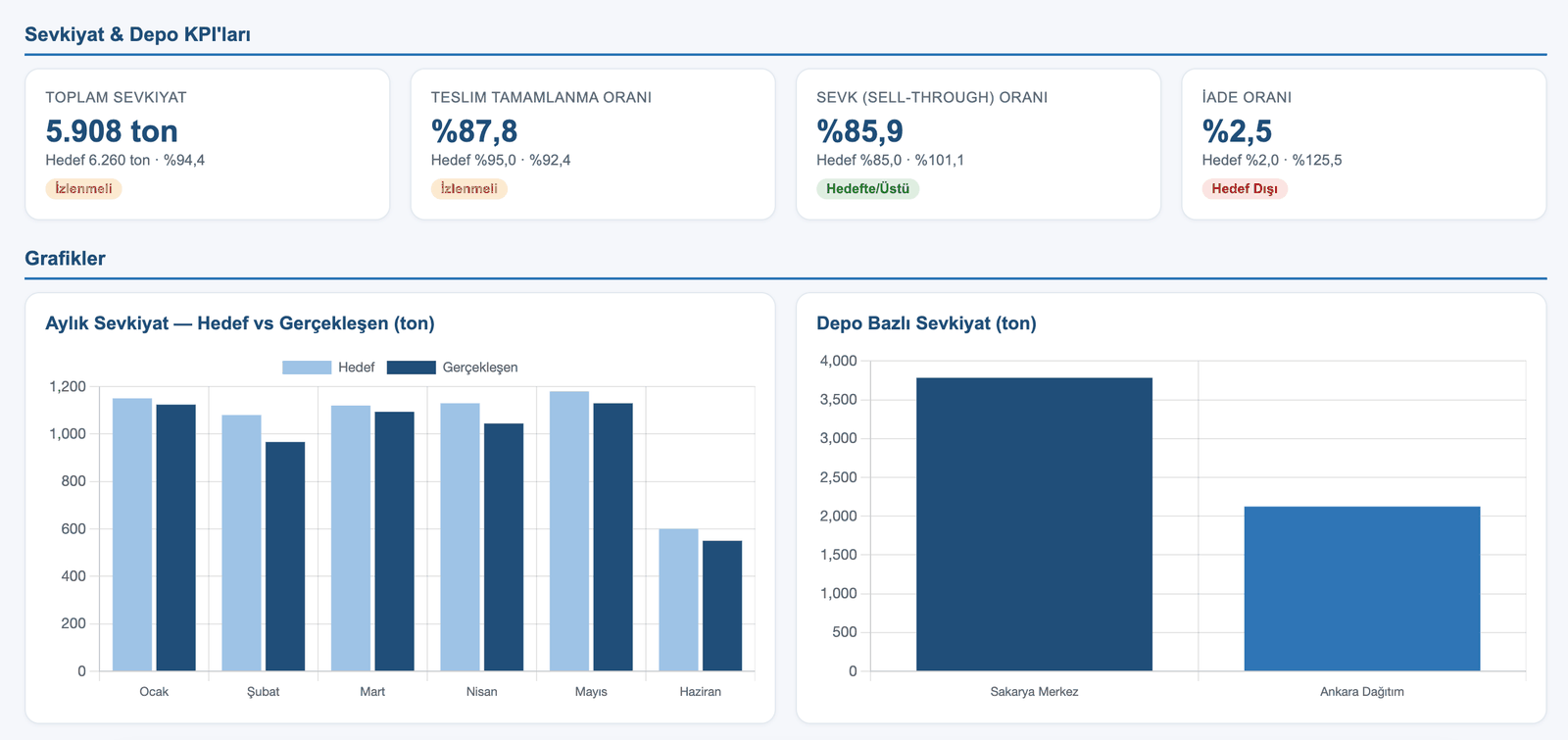
The dashboard below was produced from the real data of the PÜRSU Paper case study.

ATLAS Logistics & Warehouse dashboard — KPI cards and charts
Target vs. actual comparison, status labels (On Target / Watch / Off Target) and trend charts.

See your logistics department in ATLAS.

In the demo call we work with this department's own data.

Request a live demo